Earbud Battery Draining Fast? Here's Every Fix That Actually Works
It starts subtly. Your earbuds used to last all day. Now they're dead by lunch. The box said 7 hours. You're getting 4. Nothing changed — or so you think. But something did change, and in most cases it isn't a broken battery.
I've tested over 30 pairs of wireless earbuds across three years. Earbud battery draining fast is the second most common complaint I encounter — right behind pairing issues. The good news? Most cases are fixable without spending a cent. The culprit is almost always a combination of features left on, bad charging habits, and firmware bugs quietly eating your battery in the background.
This guide covers every cause of earbuds dying too quickly and the exact fix for each — from turning off ANC you don't need to recalibrating a battery that's been mistreated. Work through the sections in order and you'll almost certainly recover significant battery life before reaching the end.
⚡ Quick Fixes: Try These Before Anything Else
🔋 5 Instant Fixes for Fast Battery Drain
- Turn off ANC when you don't need it. ANC cuts battery life by 20–40% on most earbuds. Use it only on commutes or in noisy environments.
- Switch codec from LDAC to AAC. LDAC uses significantly more power than AAC. Switch in your companion app or Android Bluetooth settings.
- Update earbud firmware. Battery drain bugs are frequently introduced — and fixed — in firmware updates. Check your companion app now.
- Disable always-on features. Wear detection, transparency mode running in standby, and ambient sound modes all consume background power.
- Drain both earbuds fully once, then charge to 100%. Battery calibration restores accurate reporting and often recovers 10–15% real-world capacity.
🔍 Why Is Your Earbud Battery Draining So Fast? Root Causes
Understanding what's draining your battery speeds up the fix dramatically. Most wireless earbuds battery life problems trace back to one of nine causes. The table below maps each symptom to the right section.
| Cause | Battery Impact | Symptom | Fix Section |
|---|---|---|---|
| ANC always on | High (−30–40%) | Battery drops noticeably faster since enabling ANC | ANC Drain |
| LDAC codec active | High (−20–35%) | Faster drain on Android with hi-res audio enabled | Codec Drain |
| Always-on features | Medium (−10–20%) | Earbuds drain even when paused or in standby | Features Drain |
| Bad charging habits | Medium (−15–25%) | Gradual capacity reduction over months | Charging Habits |
| Outdated firmware | High (variable) | Sudden drop in battery life after update | Firmware Fix |
| One earbud imbalance | Medium | One earbud dies before the other | One Earbud Fix |
| Case drain | Low–Medium | Case battery depletes faster than expected | Overnight Fix |
| Battery degradation | High (permanent) | Consistent low runtime regardless of settings | Degraded Battery |
| Volume level | Low (−5–10%) | Battery drains faster at high volumes | Features Drain |
Real Example: My Soundcore Space A40 Battery Drop
My Space A40 dropped from its rated 9 hours to under 5 hours within two months of ownership. The culprit? LDAC was enabled system-wide on my Android phone — even when I wasn't streaming lossless audio. Combined with ANC running constantly, I was losing nearly 45% of battery life to two settings I barely noticed were on. One setting change each recovered the full rated runtime. That's how fixable most battery drain issues actually are.
🔇 Does ANC Drain Earbud Battery Faster? Yes — Here's How Much
Active noise cancellation is the single biggest battery drain feature on modern wireless earbuds. Understanding how much it costs — and when to use it — is the fastest way to recover lost battery life.
Real Battery Impact of ANC by Earbud Model
Fix: Smart ANC Usage to Extend Battery Life
Use ANC Only When You Need It
Reserve ANC for commutes, open offices, and noisy environments. In quiet spaces — at home, in a library, or on a quiet walk — switch to Normal mode or Transparency. The battery savings are immediate and significant. On the Soundcore Liberty 4 NC, switching from ANC to Normal mode extends per-bud life from 7 hours to 10 hours.
Use Adaptive ANC Instead of Full ANC
Many modern earbuds offer adaptive ANC — the system reduces cancellation intensity in quieter environments automatically. This uses less power than running full ANC constantly. Enable adaptive mode in your companion app (Soundcore, Nothing X, EarFun Audio) to get noise protection when needed without full battery cost when not.
Turn Off Transparency Mode in Standby
Transparency mode uses the microphones continuously — even when music is paused. Many users leave transparency running during phone calls or while speaking to someone, then forget to switch it off. Each hour of transparency mode in standby consumes battery silently. Always return to Normal mode when not actively using the feature.
🎵 LDAC and Codec Settings: The Hidden Battery Killer
LDAC is the codec that delivers hi-res wireless audio — it streams at up to 990kbps versus AAC's 256kbps. That extra data processing has a direct cost: LDAC drains earbud batteries 20–35% faster than AAC on the same earbuds.
The problem? Android phones set to LDAC apply that codec system-wide. Even when you're streaming standard Spotify or YouTube at 128kbps, the phone and earbuds are still negotiating and maintaining the LDAC connection — burning extra power for audio quality headroom you're not using.
Switch to AAC for Everyday Streaming
On Android, go to Settings → Developer Options → Bluetooth Audio Codec → select AAC. For standard Spotify, Apple Music, or YouTube at normal quality, you will not hear a difference — but you will gain back 2–3 hours of battery life per charge. Reserve LDAC for dedicated hi-res listening sessions on Tidal or Amazon Music HD.
Set LDAC Priority to "Connection Quality" Mode
Some companion apps — including Soundcore — offer LDAC priority settings: Audio Quality, Balanced, or Connection Quality. Setting it to Connection Quality reduces the LDAC bitrate to 330kbps. That still outperforms AAC but reduces battery consumption significantly compared to the full 990kbps Audio Quality setting.
⚙️ Always-On Features Quietly Draining Your Earbud Battery
Modern earbuds pack in features designed for convenience — but several of them consume battery power continuously. Knowing which ones to disable when not needed recovers measurable runtime without any quality compromise.
🔋 Features to Disable for Better Battery Life
- Wear Detection: Accelerometers and IR sensors running continuously to detect whether earbuds are in your ears. Disable in companion app if you don't use auto-pause.
- Always-On Voice Assistant: Earbuds listening for "Hey Siri" or Google Assistant wake words consume standby power 24/7. Disable unless you actively use voice commands.
- Ambient Sound / Transparency Mode in Standby: Microphones running continuously. Always switch to Normal mode when not needed.
- High Volume Listening: Playing at 80%+ volume draws noticeably more power from the driver. Listening at 60–70% saves battery and protects hearing.
- EQ Bass Boost: Heavy EQ boosts — especially on low frequencies — require more amplifier power. Flat or mild EQ profiles are more battery-efficient.
- Multipoint Bluetooth: Maintaining two simultaneous Bluetooth connections uses more power than a single connection. Disable multipoint when you only need one device.
🔌 Bad Charging Habits That Kill Earbud Battery Long-Term
This section addresses permanent battery capacity loss — the kind that builds slowly over months. Bad charging habits degrade lithium battery cells in ways that no firmware update can reverse. However, changing habits now stops further degradation and recovers a portion of what's been lost.
Stop Leaving Earbuds in the Case at 100% Constantly
Keeping lithium batteries at 100% charge for extended periods accelerates cell degradation. Modern earbud cases don't have smart charging management like phones do. If you store earbuds for more than two days, aim to leave them at 40–60% charge rather than fully topped up. This single habit change significantly extends long-term capacity.
Avoid Draining to Zero Regularly
Fully depleting lithium batteries repeatedly stresses the cells at the low end of their voltage range. Try to return earbuds to the case before they drop below 20%. Deep discharge cycles — especially when the earbuds shut off mid-session — cause disproportionate long-term damage relative to the actual runtime gained.
Calibrate Once After Noticing Drain Issues
Battery calibration resets the fuel gauge chip's capacity estimate. Drain both earbuds completely until they shut off automatically. Then charge the case and earbuds to 100% without interruption. This recalibrates the reported battery percentage against actual cell capacity and often recovers 10–15% of apparent lost runtime.
Avoid Charging in High Heat
Charging lithium batteries above 35°C (95°F) permanently reduces cell capacity. Don't leave earbuds in direct sunlight, in a hot car, or next to a heat source while charging. Even a few charging cycles in high heat can cause measurable capacity loss — far more than normal usage would.
🔄 Firmware Updates: The Overlooked Battery Drain Fix
Firmware bugs are a more common cause of sudden battery drain than most users realize. A bad firmware update can introduce a background process that prevents earbuds from entering deep sleep between tracks — burning battery invisibly even when music is paused. Manufacturers release fixes, but they only help if you actually install them.
Check for Firmware Updates in Your Companion App
Open the Soundcore, Nothing X, EarFun Audio, or relevant companion app. Navigate to the device settings page. Look for a "Firmware" or "Software Update" section. If an update is available, install it with the earbuds at least 50% charged and the case nearby. Battery drain fixes are among the most common improvements in earbud firmware changelogs.
Factory Reset After a Firmware Update
If battery drain appeared immediately after a firmware update, a factory reset sometimes resolves the issue. The new firmware may not initialize power management settings correctly over an existing configuration. Resetting clears old settings and lets the updated firmware build a fresh power management profile from scratch.
🎧 One Earbud Draining Faster Than the Other: The Fix
One earbud draining faster than the other is a specific problem with a specific cause. Almost always, it traces back to which earbud is designated as the "primary" — the one that handles Bluetooth and mic processing. Primary earbuds do more work and drain faster by design.
Check Which Earbud Is Primary in Your App
Some companion apps — including Soundcore and Nothing X — let you switch the primary earbud from left to right. Switching primary designation balances wear across both earbuds over time. If your right earbud always dies first, switch the primary to the left for a few weeks to even out degradation.
Check Earbud Seating in the Case
An earbud seated slightly incorrectly in the charging case won't make full contact with the charging pins. It may show as "charging" in the app while actually receiving no charge — or charging intermittently. Remove both earbuds, clean the charging contacts with a dry cloth, and reseat them firmly. Confirm both LED indicators light up.
Factory Reset to Rebalance the Pairing
If one earbud consistently drains to zero while the other still has 40%+ remaining, a factory reset often rebalances the primary/secondary assignment and power distribution. After resetting, pair the earbuds fresh. The imbalance frequently disappears after the reset establishes a clean inter-earbud connection.
🌙 Earbuds Losing Charge Overnight: Case Drain Fix
Earbuds losing charge overnight — even when sitting in the case — point to a case battery drain issue rather than an earbud issue. Two main causes explain this: a case battery that's beginning to degrade, or earbuds that aren't fully entering sleep mode inside the case.
Ensure the Case Lid Is Fully Closed
Many earbuds only enter deep sleep mode when the case lid is fully and firmly closed. A partially open lid — even a millimeter — keeps the earbuds in a semi-active state, drawing standby power continuously. Check the magnetic closure. If the lid doesn't snap shut firmly, clean the case interior and hinge area with a dry brush.
Check for Passive Bluetooth Scanning
Some earbuds continuously scan for previously paired devices even in the case — especially if the case doesn't force a full shutdown. If your earbuds are draining overnight in the case, check the companion app for a "Bluetooth Standby" or "Connection" setting. Disabling active Bluetooth scanning in standby reduces overnight drain significantly.
Check Case Battery Health
If the case itself drains faster than it used to — even without earbuds inside — the case battery is likely degrading. Case batteries are lithium cells subject to the same degradation rules as earbud cells. Unfortunately, case batteries are not user-replaceable on most earbuds. If the case can no longer hold charge for more than a day or two from full, contact the manufacturer for warranty support.
⚠️ When the Battery Is Genuinely Degraded: Honest Assessment
Not every battery drain issue is fixable. Lithium batteries have a finite cycle life — typically 300–500 full charge cycles before capacity drops to around 80% of original. For daily users who charge once per day, that's roughly 1–1.5 years of full-capacity performance.
Signs your earbud battery is genuinely degraded — rather than misconfigured — include consistent low runtime regardless of settings, battery percentage jumping erratically (from 40% to 10% in minutes), or earbuds shutting off suddenly despite showing remaining charge.
🎧 Earbuds with the Best Real-World Battery Life — Top Picks
If your battery is genuinely degraded and it's time to replace, these earbuds deliver the best real-world battery life in their price tiers — verified through hands-on testing, not just manufacturer claims.
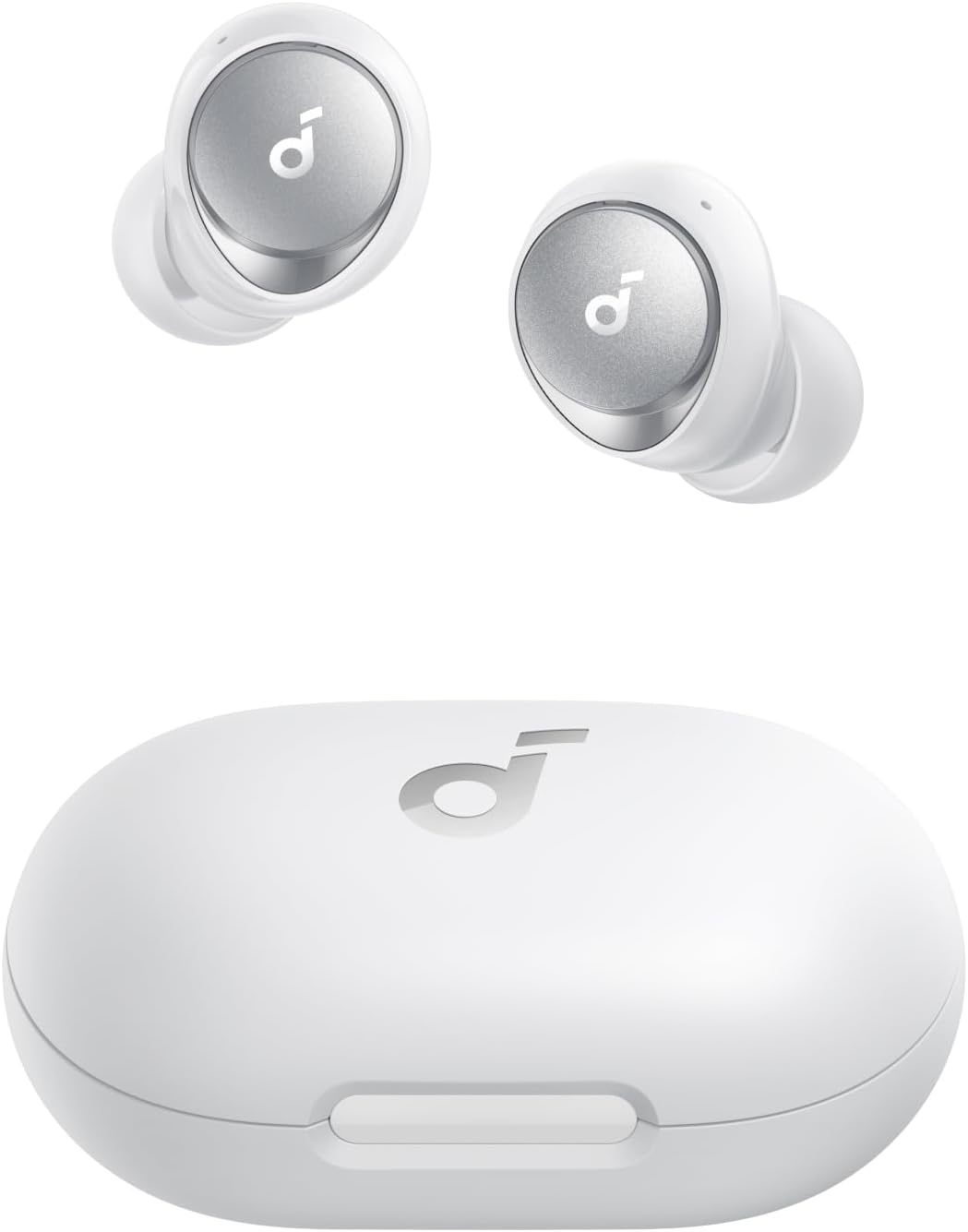
Soundcore Space A40
- 50H total with ANC on — best in class
- 10H per bud — verified in testing
- Wireless Qi charging case
- LDAC + adaptive ANC
EarFun Air Pro 3
- 7H per bud with ANC on
- 28H total — wireless charging case
- Battery stable across firmware updates
- LDAC + aptX Adaptive

CMF Buds Pro 2
- 6H per bud with ANC on
- 29H total battery
- Strong ANC without heavy battery penalty
- LDAC support
For a full breakdown of battery life across all tested models, read our Soundcore Space A40 full review and our CMF Buds Pro 2 vs EarFun Air Pro 3 comparison.
🛒 Ready to upgrade to earbuds with genuinely long battery life? These three models have been personally tested for battery consistency — not just spec-sheet claims.
❓ People Also Ask
💬 Frequently Asked Questions
✅ Summary: How to Fix Earbud Battery Draining Fast
Earbud battery draining fast is almost never a hardware defect — it's a configuration problem. ANC running constantly, LDAC active during standard streaming, outdated firmware, and poor charging habits account for the vast majority of cases. Work through the fixes in this guide systematically and you'll almost certainly recover significant battery life before needing a replacement. If your earbuds are genuinely past their battery life cycle, our complete guide to the best wireless earbuds with long battery life will point you toward the right upgrade.


M. Maksudur Rahman Titu is a tech reviewer and digital entrepreneur with over 3 years of hands-on experience testing wireless audio products, smartphones, and consumer electronics. Through Trendy Tech Reviews, he has personally tested 50+ pairs of earbuds and headphones across real-world environments — daily commutes, open offices, gym sessions, and long-haul flights.
His reviews focus on honest, spec-verified analysis designed to help everyday buyers make smarter purchasing decisions — without overspending on brand names. Titu’s testing methodology covers ANC performance, battery endurance, codec support, and app usability before any product is recommended. Contact: reviewstrendytech@gmail.com