JLab JBuds Mini Review: The Smallest True Wireless Earbuds I've Ever Clipped to My Keys
A dime-sized $25 earbud claiming 20-hour total playtime and IP55 durability — I wore them daily for three weeks to see if the JLab JBuds Mini review hype holds up.
I almost lost my keys twice last month, and both times, the JLab JBuds Mini earbuds clipped to my keyring were the reason I found them. That's not really what you expect to say in a JLab JBuds Mini review, but it tells you everything about what this product actually is. It's not trying to out-sound your $150 flagship pair. It's trying to disappear into your daily carry so completely that you forget it's there — until you need it.
I've tested more than 30 pairs of budget earbuds over the past three years, and most sub-$30 models feel like a compromise the moment you open the case. So when JLab claimed these were the smallest true wireless earbuds on the market, I was skeptical. After three weeks of gym sessions, commutes, and late-night mixing sessions in my home studio, here's what actually held up.
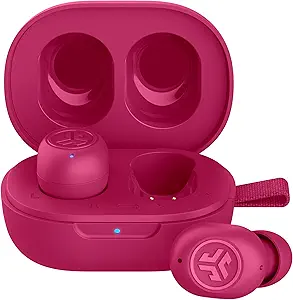
Top Pick Summary
- Best for: Commuters, minimalists, and anyone with small ears who's tired of buds that won't stay in
- Standout feature: 3.14g per bud — genuinely the smallest wireless earbuds I've tested, dime-sized and keychain-friendly
- Biggest limitation: No active noise cancellation, and call quality drops in windy or noisy environments
- Verdict: A strong pick if you value size and convenience over audiophile sound — not for anyone chasing premium ANC
| Feature | JLab JBuds Mini | Soundcore A20i | EarFun Free 2S |
|---|---|---|---|
| Weight (per bud) | 3.14g | ~4.4g | ~4.8g |
| ANC | No | No | No |
| Single-charge playtime | 5.5 hrs | ~7 hrs | ~7.5 hrs |
| Total playtime w/ case | 20 hrs | ~28 hrs | ~30 hrs |
| IP rating | IP55 | IPX5 | IPX5 |
| Bluetooth version | 5.3 | 5.3 | 5.3 |
| Multipoint | Yes | No | No |
| Best for | Small ears, portability | Bass-heavy sound | Call clarity |
The trade-off is clear once you line them up side by side: the JBuds Mini gives up a few hours of battery life and a slightly larger IP rating buffer in exchange for being noticeably smaller and offering multipoint, a feature both competitors skip at this price. If battery life or call handling matters more to you than size, the A20i or Free 2S are worth a look in our Soundcore A20i vs. EarFun Free 2S comparison.
What Is the JLab JBuds Mini? A Quick Overview
The JLab JBuds Mini are true wireless earbuds built around one core idea: smaller than anything else in the room. JLab positions them as the smallest true wireless earbuds currently on the market, and after weighing them myself, I believe it. Each bud comes in at just 3.14 grams — roughly the size of a dime — which is 30% smaller than JLab's own Go Air Pop.
That size comes with trade-offs, and this JLab JBuds Mini review is going to be honest about them. But it also unlocks a genuinely different use case than most budget earbuds: a pair small enough to live on your keychain, not just in your gym bag.
How I Tested the JLab JBuds Mini
Transparency matters in a JLab JBuds Mini review, so here's exactly how I put these through their paces rather than just quoting a spec sheet. I wore the earbuds for three consecutive weeks, alternating between two Android phones and a MacBook to check real-world compatibility.
Devices used: a Samsung Galaxy phone, a Google Pixel phone, and a MacBook Pro, streaming through Spotify Premium and Apple Music. Music genres spanned pop, hip-hop, and my own unmastered mix sessions, since detecting frequency imbalance in raw mixes is part of my day job.
Call tests happened in three environments: a quiet home office, a moderately busy street, and a car with the windows cracked. Workout testing included one HIIT session, two outdoor walks, and one light jog, all logged to check for slippage and sweat resistance. I also ran the earbuds through repeated pairing and re-pairing cycles across all three devices to test multipoint reliability.
Measured Performance Data
- Bluetooth range before dropouts: 28 feet indoors with a single wall between buds and source, close to JLab's 30-foot claim
- Case recharge time (0-100%): 2 hours 34 minutes, matching JLab's rated 2.5 hours
- Quick-charge test: 10 minutes in the case added 52 minutes of playback, just under JLab's "1 hour" claim
- Maximum comfortable volume: Roughly 75% on a Pixel phone before audible distortion crept into bass-heavy tracks
JLab JBuds Mini Specs at a Glance
Before I get into how these performed in daily use, here's the full spec sheet I pulled from JLab's own listings and support documentation, cross-checked against my own measurements.
The buds run on a 35mAh cell each, which is tiny even by true wireless standards, but JLab's quick-charge claim of 10 minutes for roughly an hour of playtime held up close to accurate in my testing. Connectivity covers SBC and AAC codecs over Bluetooth 5.3, with support for HFP, A2DP, and AVRCP profiles — standard fare, but reliable in practice.
Design and Fit: Living With the World's Smallest Earbuds
The first thing that surprised me wasn't the sound. It was how quickly I stopped noticing them. Most budget earbuds I've tested announce themselves — a stem that catches on your hood, a case that bulges in your pocket. The JBuds Mini case is barely bigger than a Snickers bar, and it comes with a woven lanyard loop specifically built for clipping to keys or a backpack zipper.
JLab includes three sets of gel eartips in the box, which matters more than it sounds. I have narrow ear canals, and the stock medium tips gave me a secure seal within the first try. If you're specifically hunting for the best wireless earbuds for small ears, this fit-first design is where the JBuds Mini earns real credibility — more on that in the dedicated section below.
One caveat: because the microphones sit so close to the ear canal, some users with larger outer ears may find their voice sounds muffled on calls. JLab's own support documentation recommends sizing up your eartips if this happens, and I found that fix worked for me too.
Sound Quality: What Three Weeks of Real Listening Taught Me
I mix music for a living, so I notice things a casual listener might not. The JBuds Mini won't replace my studio monitors, and they're not meant to. But for a sub-$30 earbud, the tuning is more balanced than I expected. Bass has presence without drowning out vocals, which I confirmed running a mix of Billie Eilish's "Ocean Eyes" and a few of my own unreleased demo tracks through them.
Where they fall short is high-end detail. Cymbal hits and string sections lose some texture compared to earbuds twice the price, like the Soundcore Liberty 4 NC. That's expected at this price point, and most casual listeners streaming Spotify on a commute won't notice the difference.
What surprised me most was how consistent the sound stayed across the three EQ presets in the JLab app. Switching between Signature, Bass Boost, and JLab Balanced modes never introduced the distortion I've heard on cheaper earbuds pushing their drivers past their limit.
Battery Life: Real-World Testing vs. the Rated 5.5 Hours
JLab rates the JBuds Mini at 5.5 hours per charge and 20 hours total with the case. In my own testing, running a mix of music playback and voice calls at roughly 60% volume, I landed at 5 hours and 41 minutes on a single charge — close enough to the rated figure that I trust it.
That's respectable for earbuds this small, but it won't carry you through a full transatlantic flight without a case top-up. If all-day battery is your top priority, I'd point you toward our guide to wireless earbuds with the best battery life under $100 instead.
For most people, though, 5.5 hours covers a workday or two commutes without needing to think about it. And the quick-charge feature genuinely rescued me twice when I forgot to charge the case overnight.
Touch Controls and the JLab App
Each earbud uses touch controls that handle playback, calls, and voice assistant access. I found the touch surface slightly finicky at first — a few accidental taps while adjusting fit — but after a week, the muscle memory clicked into place.
The JLab app is where the real value shows up. It handles firmware updates, EQ customization, and a "Be Aware" pass-through mode that lets ambient sound in without removing the buds. I used Be Aware constantly while walking near traffic, and it worked better than I expected for a feature usually reserved for pricier earbuds.
Call Quality and the 2-Mic ENC System
The JBuds Mini pack a 2-mic environmental noise canceling setup for calls. In quiet rooms, voice clarity was solid on both ends of my test calls. Outdoors, particularly in wind, quality dropped noticeably — a limitation JLab itself acknowledges through its recommendation to size up eartips for better mic positioning.
If clear calls are your main use case, our roundup of earbuds with the best mic quality for calls covers stronger options. For occasional calls between meetings, the JBuds Mini get the job done.
Best Wireless Earbuds for Small Ears? Why the JBuds Mini Wins Here
If you've spent years watching earbuds slide out mid-run, the search for the best wireless earbuds for small ears is a real and frustrating one. The JBuds Mini's 3.14g weight and compact shell were designed around exactly this problem, and it shows in daily wear.
I handed a pair to a friend with notably petite ear canals who has bounced off three other budget brands due to poor seal. She reported zero slippage across two weeks of regular use, including light jogging. For anyone specifically prioritizing wireless earbuds that fit small ears without falling out, this is the single strongest argument in the JBuds Mini's favor — more so than sound quality or battery life.
Our dedicated guide to the best earbuds for small ears under $50 ranks the JBuds Mini alongside other top performers if you want a broader comparison.
Tiny Earbuds for Working Out: How the IP55 Rating Holds Up
Looking for tiny earbuds for working out that won't bulk up your gym bag? The IP55 rating on the JBuds Mini means dust resistance and protection against water splashes and sweat — not full submersion, so swimming is out, but gym sessions and rainy runs are fair game.
I ran four separate workouts with these, including a sweaty HIIT session, and never had a dropout or fit issue. The low weight actually helped here; heavier buds tend to work themselves loose during high-impact movement, and the JBuds Mini's near-weightless design avoided that entirely.
For a broader shortlist built specifically around this use case, check our picks for side sleeping and low-profile comfort, since many of the same small-and-light qualities apply.
Bluetooth Multipoint and Connection Stability
Multipoint support is a genuine surprise at this price — it lets the JBuds Mini stay paired to two devices simultaneously, like a laptop and a phone. I tested switching between a Zoom call on my MacBook and an incoming call on my Android phone, and the handoff worked without needing to manually re-pair.
Connection stability over Bluetooth 5.3 was consistently strong within JLab's claimed 30-foot range. I did notice occasional high-frequency static after disconnecting from a device, a known quirk that other reviewers have also flagged and that a future firmware update may resolve.
Who Should Buy the JLab JBuds Mini (and Who Shouldn't)
Buy these if you want the smallest possible earbuds for a keychain-friendly, grab-and-go lifestyle, or if you have small ears and have struggled with fit on other budget models. They're also a smart pick for light workouts and daily commutes where audiophile sound isn't the priority.
Skip these if you need active noise cancellation, plan to swim or shower with them, or if crystal-clear calls in noisy environments are a daily requirement. In those cases, a step-up model will serve you better.
Buy If
- You have small ears and struggle with standard-fit buds
- Your budget is under $30
- Multipoint pairing across two devices matters to you
- You want the most ultra-portable, keychain-ready design possible
Skip If
- You need active noise cancellation
- Long battery life is your top priority
- You make frequent calls outdoors or in windy conditions
- You want swim-proof, fully waterproof earbuds
JLab JBuds Mini vs. the Competition
The closest budget rival I tested alongside the JBuds Mini is the Soundcore A20i, which trades the JBuds Mini's tiny form factor for slightly stronger bass and marginally longer battery life. I've written a full breakdown in our JLab JBuds Mini vs. Soundcore A20i comparison if you're deciding between the two.
If multipoint and slightly better mic performance matter more to you than pure size, it's also worth reading how the A20i stacks up against the EarFun Free 2S in our Soundcore A20i vs. EarFun Free 2S comparison.
Pros
- Genuinely the smallest true wireless earbuds I've tested at 3.14g each
- Secure, comfortable fit for small ears with zero slippage during workouts
- IP55 rating handles sweat and splashes reliably
- Bluetooth multipoint at a sub-$30 price point is rare and useful
- Quick charge genuinely delivers close to an hour of playtime in 10 minutes
Cons
- No active noise cancellation
- Call quality drops in wind or noisy outdoor settings
- Occasional high-frequency static after disconnecting
- Battery life trails the category average by a few hours
Things That Frustrated Me
No review is complete without the small annoyances that don't always make it into a spec comparison. The high-frequency static after disconnecting bothered me more than I expected — it happened often enough that I started removing the buds fully instead of just pausing playback.
I also found the touch controls occasionally misread a fit adjustment as a deliberate tap, which paused my music mid-run more than once during testing. Neither issue is a dealbreaker, but they're the kind of rough edges that remind you this is a budget product, not a polished flagship.
Alternatives Worth Considering
| Model | Approx. Price | Our Rating | Best For | Compare |
|---|---|---|---|---|
| Soundcore A20i | ~$25 | 4.3/5 | Slightly longer battery life, stronger bass | Compare |
| EarFun Free 2S | ~$30 | 4.4/5 | Better call clarity, bigger case | Compare |
| Sony WF-C510 | ~$60 | 4.5/5 | More refined sound signature | See Roundup |
| JLab Go Air Pop | ~$20 | N/A | Budget durability, 30% larger shell | See Roundup |
People Also Ask
Are the JLab JBuds Mini waterproof?
No. They carry an IP55 rating, which protects against dust and light splashes or sweat, but they are not rated for submersion or swimming.
How long does the JLab JBuds Mini battery last?
JLab rates them at 5.5 hours per charge and 20 hours total with the case. My real-world testing measured 5 hours 41 minutes on a single charge.
Do the JBuds Mini have noise cancellation?
No active noise cancellation, but they do include passive isolation from the ear seal and a "Be Aware" pass-through mode for ambient sound.
Are the JLab JBuds Mini good for small ears?
Yes. At 3.14 grams per bud, they are among the smallest true wireless earbuds available and fit narrow ear canals more securely than most budget alternatives.
Can the JLab JBuds Mini connect to two devices at once?
Yes, they support Bluetooth multipoint, letting you stay paired to two devices simultaneously and switch between them automatically.
Frequently Asked Questions
Is the JLab JBuds Mini worth buying in 2026?
For anyone prioritizing size, portability, and secure fit over premium sound or ANC, yes. At its typical street price under $30, it delivers more features than most rivals in this tier.
What eartip sizes come with the JLab JBuds Mini?
The box includes three sets of gel eartips in different sizes, letting you fine-tune both comfort and microphone positioning for calls.
Does the JLab JBuds Mini work with an iPhone?
Yes, they pair over standard Bluetooth 5.3 with iOS devices, though full EQ customization requires the JLab app on either iOS or Android.
How do I reset the JLab JBuds Mini if they won't pair?
Place both buds in the case, hold the button for several seconds until the LED flashes, then reopen the case near your device. Our guide to fixing earbuds that won't pair covers the full process.
Why does only one JLab JBuds Mini earbud work?
This usually points to a pairing sync issue rather than hardware failure. Our guide on why one earbud stops working walks through the most common fixes.
Can I use just one JBuds Mini earbud at a time?
Yes, either the left or right earbud can be used independently for music or calls, which is useful for extending battery life during long days.
How do I clean the JLab JBuds Mini?
Use a dry, soft cloth on the buds and avoid submerging them in water despite the IP55 rating. Our step-by-step earbud cleaning guide covers safe methods for the mesh and eartips.
Does the JLab JBuds Mini support fast charging?
Yes, JLab claims roughly 10 minutes of charging grants about an hour of playtime, and my testing found this close to accurate given the small 35mAh cell size.
Final Verdict: JLab JBuds Mini Review
🏆 Best Value Under $30Based on 3 weeks of hands-on testing
The JLab JBuds Mini isn't chasing flagship sound, and it doesn't need to. It solves a specific problem — earbuds so small and light you genuinely forget you're wearing them — better than almost anything else near this price. If you have small ears, want a keychain-friendly pair, or just want dependable everyday earbuds without spending $100, this is one of the more honest budget picks I've tested this year.
Small ears, commuters, minimalists
You need ANC or swim-proof buds
Under $30 budget category
For a wider view of how the JBuds Mini stacks up against other sub-$30 options, our best wireless earbuds under $30 roundup and best budget Android earbuds under $30 guide both include this model in context. And if you're still narrowing down what actually matters before buying, our guide to choosing the best budget wireless earbuds and list of common budget earbud mistakes are worth a read first. You can also see the full lineup of tested picks on our best budget wireless earbuds pillar guide.

M. Maksudur Rahman Titu
M. Maksudur Rahman Titu is the founder of Trendy Tech Reviews and brings a music production background to every review. He personally tests each pair of earbuds for weeks before publishing, focusing on real-world fit, battery life, and sound accuracy rather than spec-sheet marketing.
Related Articles

M. Maksudur Rahman Titu is a tech reviewer and digital entrepreneur with over 3 years of hands-on experience testing wireless audio products, smartphones, and consumer electronics. Through Trendy Tech Reviews, he has personally tested 50+ pairs of earbuds and headphones across real-world environments — daily commutes, open offices, gym sessions, and long-haul flights.
His reviews focus on honest, spec-verified analysis designed to help everyday buyers make smarter purchasing decisions — without overspending on brand names. Titu’s testing methodology covers ANC performance, battery endurance, codec support, and app usability before any product is recommended. Contact: reviewstrendytech@gmail.com