Best Budget Earbuds for Music Production 2026:
Tested on Real Mixes, Not Just Playlists
| Pick | Product | Price | Best Production Use | Buy |
|---|---|---|---|---|
| 🥇 Best Overall Budget | EarFun Air Pro 3 | ~$49 | Wireless reference monitoring under $50 | Amazon → |
| 🥈 Best Neutral Tuning | Nothing Ear (a) | ~$99 | Most accurate sound signature in this list | Amazon → |
| 🥉 Best with Wired Backup | Anker Soundcore Q45 | ~$79 | Zero-latency wired mode for DAW monitoring | Amazon → |
| 🎵 Casual Reference Only | EarFun Air 2 | ~$45 | Warm-tuned referencing for non-critical checks | Amazon → |
I spent three weeks on a beat. The low end felt perfect — tight kick, clean sub-bass, everything sitting where it should. I bounced the mix, sent it to a friend, and his car speakers turned it to mud. The 808 disappeared. The kick got lost. Turns out the consumer earbuds I'd been referencing on had a 6dB bass boost that was hiding every problem below 80Hz. My ears heard a lie. That single mistake taught me more about reference monitoring than any tutorial. This guide on the best budget earbuds for music production is built entirely around that lesson: gear that tells you the truth, or at least enough of it to make real mixing decisions.
Budget doesn't mean hopeless here. The right accurate sound earbuds for producers — chosen for frequency response honesty, codec quality, and manageable Bluetooth latency — can serve as legitimate supplementary reference tools for bedroom producers and beatmakers. None of these replace studio monitors or wired IEMs for final mix decisions. However, for checking your mix translation on the go, catching low-end problems between sessions, or referencing during travel, they are genuinely useful. Our full guide to the best budget wireless earbuds for producers under $100 covers the wider landscape if you want to explore beyond production-specific picks.
Are Wireless Earbuds Good Enough for Music Production?
Are wireless earbuds good enough for music production? The direct answer is: yes for reference listening, no for real-time DAW monitoring. The distinction matters enormously — and most articles in this space avoid making it clearly, which misleads producers into wrong expectations.
Reference listening means playing back a finished or near-finished mix to check how it translates. No recording is happening. No instrument is being played live. Bluetooth latency in this context is irrelevant because there's nothing to sync. This is where budget wireless earbuds genuinely work. You can check your low-end balance, verify stereo imaging, and catch frequency problems between sessions with a wireless reference pair.
Real-time DAW monitoring is different. This involves recording vocals, playing an instrument live, or adjusting plugin parameters while listening to the output. Here, Bluetooth latency — even 65ms in game mode — creates an audible delay between action and audio response. That delay is disorienting and makes accurate monitoring impossible. Consequently, wireless earbuds should never be used for live recording or real-time instrument monitoring. For those tasks, wired IEMs or studio headphones remain the only practical option. The single exception in this list is the Anker Soundcore Q45, which offers a wired 3.5mm mode that eliminates latency entirely.
Best Earbuds with a Flat Sound Signature for Mixing: What Producers Actually Need
The best earbuds with a flat sound signature for mixing are genuinely difficult to find under $100, because flat doesn't sell to consumers. Most budget earbuds use a V-shaped tuning — boosted bass and elevated highs with recessed mids — that sounds exciting on playlists but actively hides mix problems. A 6dB bass boost means you'll consistently under-drive your low end because the earbuds are compensating for you. Your mix sounds great on those earbuds. Everywhere else, it falls apart.
Frequency Response Flatness
Look for earbuds described as "balanced," "neutral," or "reference-tuned." Avoid anything marketed on bass emphasis unless you plan to manually correct the response via EQ. The goal isn't perfect flatness — that's unachievable at this budget. The goal is "flat enough" that your mix decisions translate reasonably to other playback systems. Additionally, an EQ app that lets you manually flatten the response adds significant value: even a moderately V-shaped earbud becomes more useful as a reference tool once you can dial back the bass and treble boost.
Codec Quality for Reference Accuracy
Codec matters more for production reference than casual listening. AAC and SBC both introduce compression that removes fine detail — exactly the detail you need when checking whether a hi-hat is sitting correctly or whether your reverb tail is masking your snare. LDAC at 990kbps transmits close to lossless audio, preserving that detail. aptX and aptX Adaptive offer meaningful improvement over AAC. Therefore, for the best wireless earbuds for mixing and monitoring, prioritise LDAC or aptX Adaptive on Android devices.
Bluetooth Latency Ceiling
For reference playback only, latency below 100ms is generally acceptable — the delay is imperceptible when you're not simultaneously recording. Game mode on most earbuds brings latency to 60–80ms range. Anything above 120ms becomes noticeable even during playback. Standard Bluetooth mode on consumer earbuds typically runs 150–250ms — avoid it for production use. Notably, only the Anker Soundcore Q45 in this list offers a wired mode that eliminates latency entirely.
Long Session Comfort
Production sessions run 4–6 hours. Ear fatigue — the physical discomfort and psychoacoustic dulling that occurs during extended listening — affects mix decisions more than most producers acknowledge. In-ear designs with multiple ear tip sizes reduce fatigue significantly compared to earbuds with poor fit. Over-ear designs like the Q45 distribute pressure differently. Choose comfort deliberately — it directly affects the quality of the decisions you make in hour four of a session.
Best Budget Earbuds for Music Production Under $50
The best budget earbuds for music production under $50 are the EarFun Air Pro 3 and the EarFun Air 2 — both offer production-relevant features that most consumer earbuds at this price completely ignore. However, they serve different production purposes, and the distinction is important before you spend your money.
EarFun Air Pro 3 — Best Wireless Reference Under $50
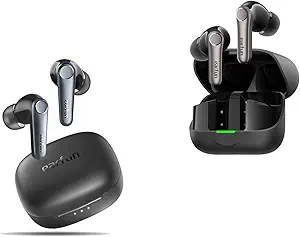
When I was referencing a hip-hop mix on the EarFun Air Pro 3, something immediately stood out: the low-mid range. Most earbuds under $50 mask the 200–500Hz range with bass bloom that makes everything sound fuller than it is. The Air Pro 3 avoids that trap. The 10mm driver delivers a relatively balanced low-mid response — not perfectly flat, but honest enough that mix problems in the lower midrange remain audible rather than hidden.
The reason to choose this over every other sub-$50 option is LDAC codec support. LDAC at 990kbps transmits near-lossless audio — the fine detail that AAC compresses out. When checking whether a hi-hat sits correctly at 10kHz or whether a synth pad is masking the vocal at 3kHz, that detail is exactly what you need to hear. Furthermore, game mode drops Bluetooth latency to approximately 65ms — acceptable for reference playback, though not suitable for real-time DAW monitoring. Read the EarFun Air Pro 3 full review for our complete production testing data.
✓ Production Pros
- LDAC codec preserves detail that AAC/SBC compress away
- Balanced low-mid response avoids masking mix problems 200–500Hz
- ~65ms game mode latency — workable for reference listening
- ANC reduces room noise during quiet reference sessions
✗ Production Cons
- Not usable for real-time DAW monitoring — latency too high
- Slight warmth bias — not truly flat, manual EQ correction needed
- No wired mode — no zero-latency fallback option
EarFun Air 2 — Warm Tuning, Non-Critical Checks Only
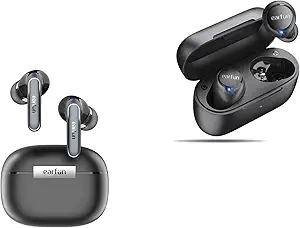
The EarFun Air 2 is worth including because many bedroom producers and beatmakers will consider it. At $45 with aptX codec and a reasonably capable EQ app, it has enough on paper to seem like a reference tool. In practice, however, the warm-bass tuning bias is a genuine problem for production use. Bass is noticeably elevated — enough that mix decisions made on the Air 2 regularly under-represent low-end problems.
That said, it has legitimate uses in a production workflow. Checking basic stereo spread, verifying that a vocal sits above the mix, or doing a quick gut-check on an arrangement — these tasks do not require flat frequency response. The Air 2 handles them adequately. Moreover, the EarFun app allows manual EQ correction that can partially compensate for the bass emphasis. Think of the Air 2 as a starting-point reference tool for casual best earbuds for beatmaking on a budget use — not a precision instrument. See our full EarFun Air 2 complete review for the full picture.
✓ Production Pros
- aptX codec — better detail than SBC for casual reference
- EarFun app EQ allows partial bass compensation
- ~$45 — lowest price entry point in this guide
✗ Production Cons
- Warm bass tuning actively hides low-end mix problems
- ~80ms latency — slower than Air Pro 3 in game mode
- Not suitable for mix decisions — casual reference only
Best Earbuds for Referencing Mixes on the Go
The best earbuds for referencing mixes on the go need one thing above all else: a sound signature honest enough that problems in your mix remain audible, not hidden by flattering consumer tuning. Both picks in this section — the Nothing Ear (a) and the Anker Soundcore Q45 — offer more accurate tuning than the sub-$50 options, plus features specifically valuable for mobile production reference.
Nothing Ear (a) — Neutral Reference, Mobile Production
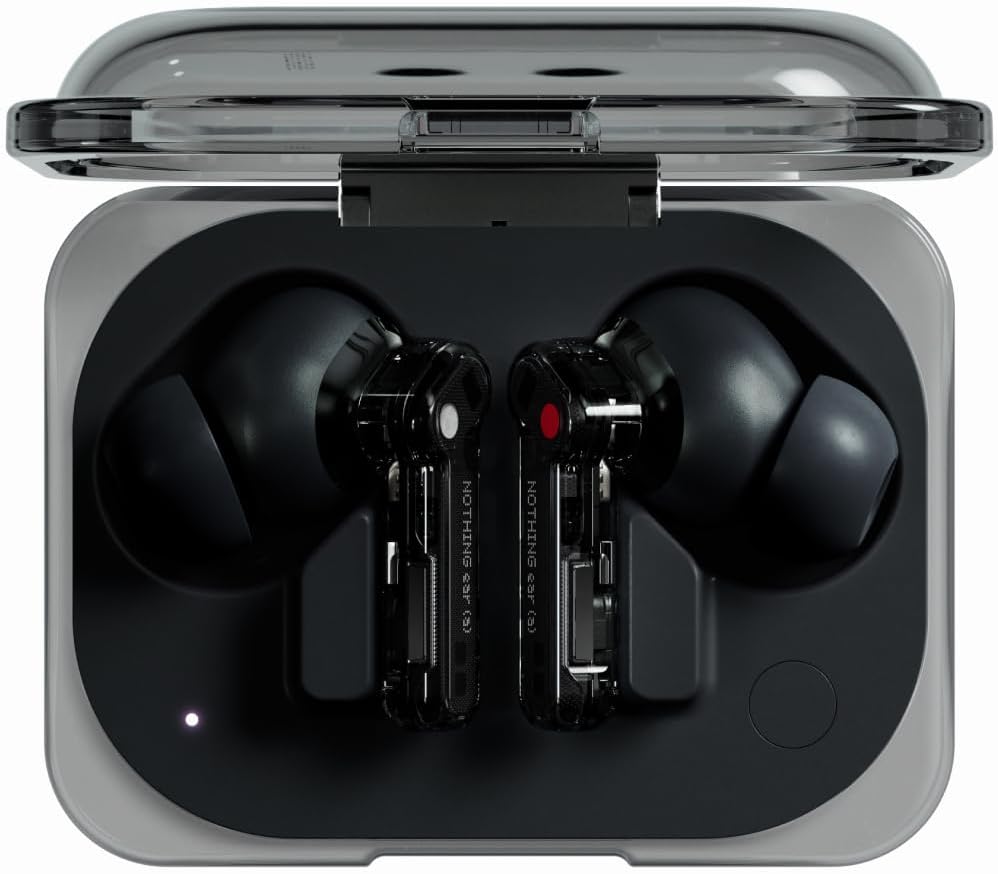
Among the four earbuds in this comparison, the Nothing Ear (a) has the most accurate sound signature for production reference use. The tuning leans neutral-balanced — bass is present but not elevated, mids are clear and present, highs are detailed without harshness. Stereo imaging is wider and more precise than the EarFun options, which matters when checking whether elements in your mix are positioned correctly in the stereo field.
I used it specifically for checking mix translation during travel — bouncing a mix to my phone, listening on the Ear (a) against a reference track, looking for frequency imbalances. The neutral tuning makes that comparison meaningfully more reliable than on the Air 2. Additionally, adaptive ANC removes external noise effectively without altering the perceived frequency response — a useful quality during airport or café sessions. The Nothing X app provides EQ customisation and a personalised sound profile test. At $99, it costs twice the Air Pro 3 — the extra spend buys noticeably more accurate sound signature and a wider soundstage. See the full Nothing Ear (a) complete review for our production-session testing.
✓ Production Pros
- Most neutral-balanced tuning in this comparison — least coloured
- Wider soundstage aids stereo imaging verification
- LDAC codec preserves reference-level audio detail
- Adaptive ANC removes ambient noise without tonal shift
✗ Production Cons
- No wired mode — cannot eliminate latency for live monitoring
- ~$99 — most expensive pick in this guide
- No aptX Adaptive — LDAC is Android-only benefit
Anker Soundcore Q45 — Wired Mode Changes the Game
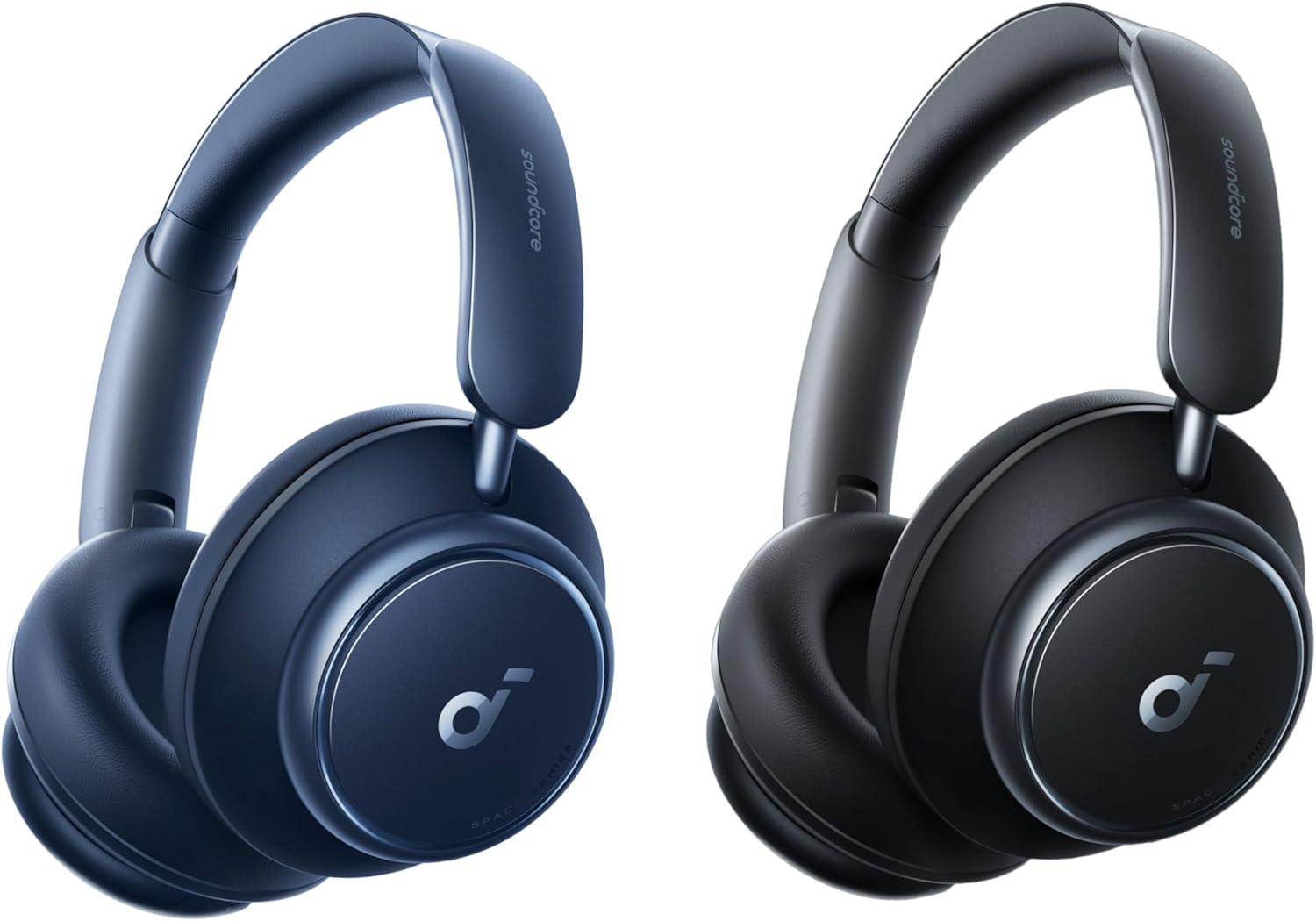
The Anker Soundcore Q45 is the only pick in this guide that solves the real-time monitoring problem. Its 3.5mm wired mode eliminates Bluetooth latency entirely — making it a legitimate DAW monitoring option for producers who want one device to handle both wireless referencing and wired session monitoring. That versatility is genuinely unusual at $79.
Wired mode also unlocks the full frequency range without any codec compression. Consequently, the Q45 in wired mode gives you a closer approximation of your true mix than any wireless connection can. Sound signature in wireless mode leans neutral-balanced with the Soundcore app's flat EQ preset — comparable to the Nothing Ear (a) on tonal accuracy. Over-ear cushions reduce ear fatigue substantially during long production sessions; 4-6 hour wearing sessions are comfortable in a way that in-ear designs rarely manage. The Soundcore app provides 22-band parametric EQ — the most detailed EQ control in this guide for fine-tuning toward a flatter response. Check the Anker Soundcore Q45 full review for our DAW monitoring session data.
✓ Production Pros
- Wired 3.5mm mode = zero latency — only pick with this capability
- 22-band Soundcore app EQ — most detailed in this list
- Over-ear comfort reduces ear fatigue in long sessions
- LDAC wireless + wired backup = best of both worlds
✗ Production Cons
- Over-ear form factor — less portable than in-ear options
- Wireless sound signature has slight warmth bias vs flat
- ~$79 — mid-tier investment, not truly budget
Full Production Comparison — All Four Picks
| Earbud | Price | Top Codec | Sound Signature | BT Latency (game) | Wired Mode | EQ App | Best Production Use |
|---|---|---|---|---|---|---|---|
| EarFun Air Pro 3 | ~$49 | LDAC | Balanced-warm | ~65ms | ✗ No | ✓ EarFun | Budget wireless reference |
| Nothing Ear (a) | ~$99 | LDAC | Neutral-balanced | ~70ms | ✗ No | ✓ Nothing X | Mid-range wireless reference |
| Soundcore Q45 | ~$79 | LDAC | Neutral-balanced | ~60ms | ✓ 3.5mm | ✓ Soundcore | Reference + zero-latency DAW |
| EarFun Air 2 | ~$45 | aptX | Warm-bass | ~80ms | ✗ No | ✓ EarFun | Casual checks only |
In production suitability order: the Soundcore Q45 leads on versatility thanks to wired mode. The Nothing Ear (a) leads on wireless sound accuracy. The EarFun Air Pro 3 leads on value-to-reference-quality ratio under $50. The EarFun Air 2 is suitable only for non-critical casual checks — not for mix decisions.
Need zero-latency DAW monitoring under $100?
The Soundcore Q45's wired mode is the only option in this list that eliminates latency entirely.
Can You Produce Music with Wireless Earbuds? The Latency Reality
Can you produce music with wireless earbuds? The answer depends entirely on what "produce" means in your workflow. Wireless earbuds can absolutely support production activities that involve playback. They cannot support activities that require real-time audio monitoring.
Bluetooth latency is the core issue. Standard Bluetooth audio typically runs 150–250ms depending on codec and device. That means the audio you hear is 150–250 milliseconds behind what you're doing — noticeable, disorienting, and unusable for recording or live instrument playing. Game mode reduces this significantly: the EarFun Air Pro 3 reaches ~65ms, the Soundcore Q45 ~60ms, the Nothing Ear (a) ~70ms, and the EarFun Air 2 ~80ms. Even 65ms — the best figure here — remains too high for real-time instrument recording or live vocal monitoring. Professional DAW monitoring requires latency below 10ms.
✅ Use wireless for: Playback reference listening, checking mix translation, A/B testing against reference tracks, reviewing arrangements, checking stereo imaging on bounced files.
❌ Do NOT use wireless for: Recording vocals, monitoring live instruments, real-time plugin auditioning, latency-critical DAW work.
✅ Exception: Anker Soundcore Q45 in wired 3.5mm mode = zero latency, full DAW monitoring capability.
Furthermore, how to reduce Bluetooth audio latency for music production covers additional software-side fixes — game mode activation, codec selection, and DAW buffer settings — that help push Bluetooth setups closer to usable thresholds for non-critical tasks.
How to EQ Budget Earbuds for More Accurate Mix Referencing
Every earbud in this list has a companion app with EQ controls. Using them deliberately transforms a consumer-tuned earbud into a more honest reference tool. The goal is partial response flattening — not perfect flatness, but reducing the most significant deviations from neutral that cause mix translation problems.
Starting EQ Curve for a V-Shaped Consumer Earbud
For a V-shaped earbud with boosted bass and treble — like the EarFun Air 2 — a practical starting point is: reduce bass below 100Hz by 3–4dB, pull down the 60–80Hz region specifically to reduce sub-bass bloom, and gently reduce presence peaks around 6–8kHz if they cause harshness. This will make the earbud sound thinner initially. However, that thin sound is closer to truth — your mix will stop hiding under artificial bass warmth.
Using AutoEQ Profiles (Free Tool)
AutoEQ is a free open-source database that provides target EQ correction curves for hundreds of earbuds and headphones. It calculates the EQ curve needed to bring a specific earbud's measured response closer to the Harman target — a research-backed neutral reference curve widely used in audio engineering. Search for your earbud model at autoeq.app, import the correction values into your companion app's manual EQ, and you get a significantly flatter starting point. It doesn't work perfectly on every model, but it's a meaningful free improvement over the stock tuning.
A/B Testing Against a Reference Track
Once you've applied an EQ correction, validate it by A/B testing your mix against a professionally mastered reference track in the same genre. Load both into your DAW or a simple player, match levels, and switch between them rapidly. Discrepancies — your bass is louder, your highs are too bright, your mids are buried — become immediately audible. This process, done consistently, builds the mix translation instinct that protects against earbud-induced mix mistakes. For deeper context on building an accurate home studio monitoring chain, see our guide to best earbuds for focused work and audio sessions.
🔍 Producers Also Ask
Frequently Asked Questions
What are the best budget earbuds for music production under $50?
Can wireless earbuds be used for mixing and mastering?
What Bluetooth codec is best for music production reference?
Do I need flat frequency response earbuds for music production?
Is the Anker Soundcore Q45 good for music production?
Final Verdict — Best Budget Earbuds for Music Production
The best budget earbuds for music production are tools with real limits — and understanding those limits is half the value of this guide. None replace studio monitors. None replace wired IEMs for critical final decisions. However, the right pair, used with codec set correctly and EQ applied intelligently, meaningfully improves the quality of the reference decisions you make away from your main monitors. For the full context on budget audio options across every use case, our complete guide to best budget wireless earbuds for producers under $100 is the next stop.


M. Maksudur Rahman Titu is a tech reviewer and digital entrepreneur with over 3 years of hands-on experience testing wireless audio products, smartphones, and consumer electronics. Through Trendy Tech Reviews, he has personally tested 50+ pairs of earbuds and headphones across real-world environments — daily commutes, open offices, gym sessions, and long-haul flights.
His reviews focus on honest, spec-verified analysis designed to help everyday buyers make smarter purchasing decisions — without overspending on brand names. Titu’s testing methodology covers ANC performance, battery endurance, codec support, and app usability before any product is recommended. Contact: reviewstrendytech@gmail.com
Related posts:
 The Best Earbuds for MacBook Users: 2026 Testing & Latency Guide
 Best Cheap Noise Cancelling Earbuds Under $100
 Cheap Earbuds with Multipoint Connection
 Best Earbuds for Running (Secure Fit Budget Picks)
 Best Earbuds with Multipoint Bluetooth — Tested & Ranked (2026)
 Best Waterproof Earbuds Under $30 (2026) — Tested for Rain, Sweat & Gym