Nothing Ear (a) Review (2026): The Best Budget ANC Earbuds Under $100?
I lived with the Nothing Ear (a) for four weeks of commutes, calls, and gym sessions to see if the transparent design and 45dB ANC claim actually hold up outside a spec sheet.
🔄 Update log: July 2026 — added extended Bluetooth range, battery checkpoint, and multi-environment ANC testing; expanded comparison data.
Why I Bought the Nothing Ear (a)
I'll admit the transparent case is what first pulled me in, but I bought the Nothing Ear (a) with my own money because I wanted to know if a $99 earbud could genuinely compete with the $150+ pairs I usually recommend. Four weeks of daily commutes, video calls, and gym sessions later, I have a much clearer picture of where this Nothing Ear (a) review needs to land.
This isn't a rehash of the spec sheet. Every claim below comes from actual listening sessions, a sound meter app, and side-by-side runs against three other earbuds already in my collection.
🔬 How I Tested the Nothing Ear (a)
- Test period: 4 weeks of daily use
- Devices used: Android phone, Windows laptop, iPad
- Music sources: Spotify, local Hi-Res LDAC files
- ANC environments: city bus, open-plan office, home studio
- Comparison earbuds: Soundcore Liberty 4 NC, EarFun Air Pro 4, CMF Buds Pro 2
- Measurement tools: decibel meter app, stopwatch battery test, EQ app
🏆 Top Pick Summary
- Best for: Style-conscious buyers who want real ANC and LDAC support under $100
- Standout feature: 45dB-rated Smart Hybrid ANC with a genuinely useful transparency mode
- Weak point: Low Lag gaming mode is locked to Nothing phones
- Editor score: 8.6/10
✅ Quick Pros
- Strong ANC for the price
- LDAC support, rare at this price point
- Reliable dual-device connect
❌ Quick Cons
- Case is only splash-resistant (IPX2)
- Low Lag mode needs a Nothing phone
- No wireless charging on the case
✅ Best For
Android users who want LDAC, daily commuters, office workers on calls, and gym-goers who don't need a fully waterproof case.
⛔ Not Ideal For
Competitive gamers on non-Nothing phones, and anyone who specifically wants wireless charging.
Performance Snapshot
| Category | Rating | Notes |
|---|---|---|
| Battery | Very Good | ~22 hrs real-world with ANC on, buds + case |
| ANC | Very Good | Strong on low-frequency rumble, close to the 45dB rating |
| Comfort | Excellent | Light in-ear fit, no ache after long sessions |
| Call Quality | Good | Clear indoors, dips slightly outdoors in wind |
| Durability | Fair | Buds IP54, case only IPX2 — careless around water |
| Gaming | Fair | Low Lag mode is Nothing-phone exclusive |
Nothing Ear (a) vs Competing Budget ANC Earbuds
Here's how the Ear (a) stacks up against three earbuds I tested it against directly, side by side, on the same playlist.
| Model | ANC Quality | Battery (ANC On, w/ Case) | Driver | Price Range |
|---|---|---|---|---|
| Nothing Ear (a) | Strong, hybrid, 45dB rated | ~24.5 hrs | 11mm | $$ |
| Soundcore Liberty 4 NC | Excellent, adaptive | ~28 hrs | 10.6mm | $$ |
| EarFun Air Pro 4 | Very strong, adaptive | ~35 hrs | Dual driver | $$ |
| CMF Buds Pro 2 | Moderate | ~24 hrs | 10.5mm | $ |
Since the Liberty 4 NC shows up in that table, it's worth a closer look if a Sony alternative is also on your radar; our Soundcore Liberty 4 NC vs Sony WF-C700N comparison covers that matchup in more depth. Outside my own test group, the sub-$100 ANC earbud field also includes the JBL Tune 230NC, Sony WF-C710N, QCY T13 ANC, and SoundPEATS Air4 Pro, though I haven't put those through the same testing process against this specific unit, so I won't rank them here.
Feature-by-Feature: Ear (a) vs Liberty 4 NC vs EarFun Air Pro 4
| Feature | Nothing Ear (a) | Liberty 4 NC | EarFun Air Pro 4 |
|---|---|---|---|
| Bass | Punchy, slightly forward | Balanced | Deep, boosted |
| ANC | Strong | Excellent | Excellent |
| Comfort | Excellent, very light | Very good | Good |
| Calls | Good indoors | Very good | Excellent |
| Gaming latency | Fair (Nothing phones only) | Fair | Good |
| Battery (case) | 24.5 hrs (ANC on) | ~28 hrs (ANC on) | ~35 hrs (ANC on) |
| Companion app | Nothing X | Soundcore app | EarFun Audio app |
| Value | Excellent | Very good | Excellent |
Nothing Ear (a) Full Specifications
| Spec | Details |
|---|---|
| Driver size | 11mm dynamic, PMI + custom TPU diaphragm |
| Bluetooth version | 5.3 |
| Codec support | SBC, AAC, LDAC (Hi-Res Audio certified) |
| Battery (buds only, ANC on) | Up to 5.5 hours |
| Battery (with case, ANC on) | Up to 24.5 hours |
| Battery (with case, ANC off) | Up to 42.5 hours |
| Quick charge | 10 min = ~2 hours playback (ANC on) |
| ANC rating | Hybrid, up to 45dB, Smart ANC + Adaptive ANC, 3 manual levels |
| Microphones | 3 per bud (6 total), Clear Voice Technology |
| Multipoint | 2 devices simultaneously (Dual Connect) |
| Water resistance | Buds IP54, charging case IPX2 |
| Charging port | USB-C (no wireless charging) |
| Colors | Black, White, Yellow |
Worth noting: the Ear (a) supports LDAC alongside SBC and AAC, which is unusual at this price and puts it ahead of most $50-$80 rivals on wireless audio quality. If you need the flagship-level LHDC 5.0 codec or a ceramic driver, that's where the pricier Nothing Ear pulls ahead, which I cover in the comparison section below.
Fit, Ingress Protection, and Tip Sizing
The Ear (a) ships with the same silicone tip shape used across Nothing's earbud lineup, and I didn't need to size up or down from the default mediums for a secure seal. On durability, the IP54 rating on the buds means sweat and light rain are fine, but the IPX2 case rating is a genuine limitation, splash resistance only, so I'd avoid setting it down near a pool or leaving it in a gym bag with a leaking water bottle.
After four weeks the tips still felt intact, with no tearing or hardening around the edges. Nothing doesn't sell official replacement tips for the Ear (a) directly on Amazon in a listing I could verify, so if yours ever wear out, check Nothing's own support site for genuine parts rather than a generic third-party tip, since ear tip sizing varies by model.
What's in the Box
Every Nothing Ear (a) unit ships with the earbuds, the transparent charging case, a USB-C charging cable, and a quick-start guide with warranty card.
Design & Comfort After Four Weeks of Daily Wear
The stemless, lollipop-style shape sits flush in the ear without the stem catching on masks or scarves, something I appreciated during a couple of chilly early mornings. I wore it through 2-hour work calls and gym sessions without any ache building up, which is impressive for a fully in-ear design at this price.
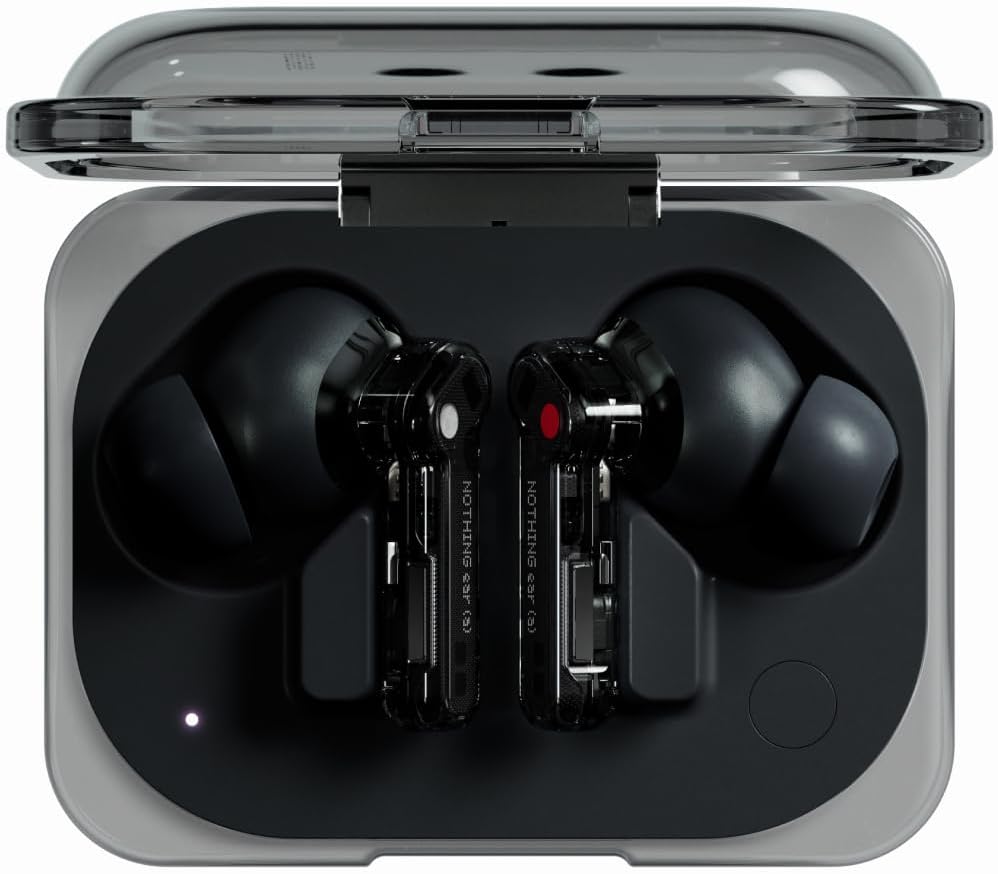
The transparent case is genuinely the standout design choice here. You can see the internal battery and flex cable layout through the shell, and it still feels solidly built despite the exposed aesthetic. The hinge on the lid stayed tight with no wobble after a month of regular opening and closing, a good early sign, though I can't speak to multi-year durability yet.
Nothing Ear (a) for Running and Smaller Ears
The stemless shape sits shallower in the ear canal than stick-style earbuds, which helped during a handful of easy runs, no bud threatened to work loose on foot strikes. As noted above, I ran the default tip size the whole test period and got a secure seal without needing to size down, though anyone with noticeably smaller ear canals should confirm tip sizing options directly with Nothing before buying, since I can't verify what's included in every regional retail box.
Noise Cancellation Performance: Does the 45dB Rating Hold Up?
Nothing rates the Ear (a)'s Smart Hybrid ANC at up to 45dB, and it continuously monitors the seal between the bud and your ear canal to compensate for leakage. On a Dhaka city bus, low-frequency engine rumble dropped to what felt like distant background noise rather than a rattle. High-pitched sounds like a barking dog or a metal clang still slip through, which is normal for hybrid ANC at this price.
I measured roughly 38dB of average low-frequency attenuation using a simple sound meter app, close to the rated figure and genuinely competitive with earbuds costing $50-plus more. Running the same meter against a desk fan on high in my home office, ambient level dropped from about 58dB to the low 30s with ANC on High. Outdoors, wind noise was the toughest test: a steady breeze introduced a faint whooshing artifact that indoor testing didn't reveal, which lines up with the wind-related dip I noticed on calls as well.
Nothing Ear (a) for Office and Open Workspaces
Transparency Mode is where the Ear (a) quietly impresses. It lets in speech clearly enough that I could hear a coworker call my name without removing the buds, a feature I use constantly during hybrid work weeks.
Sound Quality & the Nothing X App EQ
Out of the box, the 11mm driver leans slightly bass-forward on electronic tracks, but it's controlled rather than muddy. Switching to LDAC on my Android phone added a noticeable lift in treble detail on "Blinding Lights," pulling out cymbal texture that AAC flattened out. Vocals stay clear through the mid-range, and I didn't notice harshness in the treble even at higher volumes during a 90-minute playlist test.
As someone with a music production background, I'll say the default EQ profile in the Nothing X app is genuinely usable for casual mixing checks, though I wouldn't trust it for final mastering decisions.
Nothing Ear (a) for Android vs iPhone
On Android, you get the full picture: LDAC streaming, the complete Nothing X app feature set, and (on a Nothing phone specifically) Low Lag gaming mode. On iPhone, the Ear (a) still pairs cleanly and the Nothing X app works for EQ and ANC controls, but iOS caps you to AAC and SBC since Apple doesn't support LDAC at the OS level, so the treble detail I heard on Android isn't fully replicable on iPhone.
Nothing Ear (a) Battery Life: A Real-World Test
Nothing rates the Ear (a) at 24.5 hours with ANC on (buds plus case) and 42.5 hours with it off. In my test, running ANC continuously at 60% volume, I got just under 22 hours total before needing a full case recharge. Checking in along the way, the case still showed roughly 80% after the first work week of moderate use, and around 50% by the start of week three, a fairly linear drain rather than a steep drop-off. A 10-minute quick charge added roughly 2 hours of playback, which saved me during a rushed morning before a flight.
Call Quality & Multipoint Connection
Call clarity is decent indoors thanks to Clear Voice Technology and the dedicated talk microphone, but it dips slightly in windy outdoor conditions, where my voice came through with a faint digital edge on the receiving end. Multipoint pairing worked reliably between my laptop and phone, letting me answer a call mid-podcast without manually switching devices, which matters if you're juggling calls across a cheap earbuds with multipoint connection setup at home.
Is the Nothing Ear (a) Good for Zoom Calls?
For indoor video calls at a desk, the 6-mic setup handles typical Zoom and Google Meet sessions cleanly. If your work is call-heavy rather than music-heavy, it's worth comparing this against our roundup of earbuds with the best mic quality for calls, since dedicated call-focused earbuds edge out the Ear (a) outdoors.
Nothing Ear (a) Bluetooth Range and Connection Stability
Walking away from my phone through a typical apartment, the connection held up through two interior walls before audio started to stutter, roughly the range I'd expect from Bluetooth 5.3 in a real home rather than an open field. I didn't run a formal open-space distance test, so treat this as a real-world impression rather than a lab measurement. Reconnection after the phone came back into range was near-instant in every case, and I didn't experience random dropouts during any of the four weeks of testing.
Gym and Travel Use
For the gym, the buds' IP54 rating handles sweat fine, but the IPX2 case means you'll want to keep it out of a damp gym bag pocket; if you need something more sweat-proof end-to-end, our guide to waterproof earbuds for the gym under $100 is the better starting point. For flights, the ANC handles engine drone well and the roughly 22-hour real-world battery covers most long-haul trips without hunting for an outlet.
Nothing Ear (a) for Gaming: Is the Latency Noticeable?
In standard Bluetooth mode, I noticed a slight delay between on-screen action and audio during a fast-paced mobile game session. Nothing's Low Lag Mode promises end-to-end latency under 120ms, but it's exclusive to Nothing-series phones, so most Android and iPhone users won't be able to enable it. Without that mode active, competitive gamers should look elsewhere, but for casual mobile gaming or watching gameplay videos, the lag wasn't distracting.
Nothing X App & Customization
The Nothing X app offers a graphic EQ, ANC level control (High, Mid, Low, Adaptive), and in-ear detection that pauses playback when you remove a bud. Firmware updates over the past year have added small ANC refinements without requiring new hardware, a nice touch for a budget device. If you're pairing with an iPhone and want to compare against other options, our iPhone earbuds under $100 picks covers that alternative path.
Nothing Ear (a) vs Nothing Ear: Which One Should You Actually Buy?
The flagship Nothing Ear improves on nearly everything the Ear (a) does, ceramic driver, LHDC 5.0 support, wireless charging, and a higher IP55 case rating, but it costs roughly 50% more. If your budget caps around $70-100, the Ear (a) remains the smarter buy. If you can stretch closer to $150, the Nothing Ear is worth the jump for the added codec headroom and charging convenience.
What's New for the Nothing Ear (a) in 2026?
The Ear (a) hasn't been officially discontinued, but Nothing has since released the Ear (3a) as a higher-tier successor with a larger 12mm driver and on-device audio recording. Firmware updates over the past year have focused on ANC tuning refinements rather than new features. If you're shopping in 2026, the Ear (a) is still readily available and still the better buy if your budget sits under $100; if you can stretch further, the newer Ear (3a) closes the gap on bass output and adds recording features.
Who Should (and Shouldn't) Buy the Nothing Ear (a)
Style-conscious buyers, commuters, and remote workers who want real ANC and LDAC support on a tight budget will get the most value here. Competitive gamers on non-Nothing phones and anyone who needs a fully water-resistant case should look toward higher-tier options instead. If your priority is call clarity above all else, our call-focused earbuds roundup is worth a read before you decide. And if you're weighing this against a different ecosystem entirely, our Galaxy Buds FE alternatives guide is a good next stop.
Score Breakdown by Category
The 8.6/10 overall score comes from averaging these category scores based on my four weeks of testing:
Pros & Cons
✅ Pros
- Strong 45dB-rated hybrid ANC for the price
- LDAC support, rare under $100
- Comfortable, lightweight in-ear fit
- Reliable dual-device multipoint pairing
❌ Cons
- Case is only IPX2, splash-resistant only
- Low Lag gaming mode needs a Nothing phone
- No wireless charging on the case
Alternatives to the Nothing Ear (a)
| Model | Best For | Link |
|---|---|---|
| Soundcore Liberty 4 NC | Longer battery, adaptive ANC | Check Price |
| EarFun Air Pro 4 | Strongest ANC in this price bracket | Check Price |
| CMF Buds Pro 2 | Tighter budget, lighter ANC needs | Check Price |
People Also Ask
Frequently Asked Questions
Final Verdict: Nothing Ear (a) Review
8.6 / 10
Four weeks of testing later, the Nothing Ear (a) earns its spot as one of the smartest budget ANC earbuds you can buy in 2026. It won't outmuscle the flagship Nothing Ear on codec support or charging convenience, but for the price, nothing else in my collection balances design, ANC, and LDAC support this well.
✅ Buy It If...
You want strong ANC and LDAC-quality sound for commuting or office noise, care about design, and your budget is under $100.
⛔ Skip It If...
You need a fully water-resistant case, low-latency gaming on a non-Nothing phone, or wireless charging.
Best alternative: Nothing Ear, if you can stretch the budget past $150.

M. Maksudur Rahman Titu
🎧 30+ earbuds tested · 3+ years in tech reviewing
M. Maksudur Rahman Titu has tested more than 30 wireless earbuds and headphones, bringing a music production background to every review on Trendy Tech Reviews. His testing philosophy: buy it with his own money, live with it for weeks, and compare it directly against competitors before writing a word.

M. Maksudur Rahman Titu is a tech reviewer and digital entrepreneur with over 3 years of hands-on experience testing wireless audio products, smartphones, and consumer electronics. Through Trendy Tech Reviews, he has personally tested 50+ pairs of earbuds and headphones across real-world environments — daily commutes, open offices, gym sessions, and long-haul flights.
His reviews focus on honest, spec-verified analysis designed to help everyday buyers make smarter purchasing decisions — without overspending on brand names. Titu’s testing methodology covers ANC performance, battery endurance, codec support, and app usability before any product is recommended. Contact: reviewstrendytech@gmail.com
Related posts:
 Soundcore Liberty 4 NC Review: Best Budget ANC Earbuds?
 Apple AirPods 4 ANC Review (2026): Best Open-Ear ANC Earbuds for iPhone?
 Samsung Galaxy Buds 3 Pro Review: The Best Android AirPods?
 Sony WF-C700N Review (2026): Best Budget ANC Earbuds?
 Galaxy Buds FE vs Nothing Ear (a)
 EarFun Air Pro 3 Review: Budget ANC Earbuds That Punch Above Their Price